Japan Passport Photo Maker
The current database preset for a Japan passport photo is 35 × 45 mm with a plain white background. The head, from chin to crown, must occupy 71–80% of the photo's height. For digital submission that is 413 × 531 pixels at 300 DPI. The database record was reviewed on 2026-07-13; confirm the current rule with the issuing authority. IDPhotoTool offers background processing as a tool capability; this is not a claim that the authority explicitly permits digital replacement.
Make yours below — free preview, one-time $3.99 for HD.
Before you upload
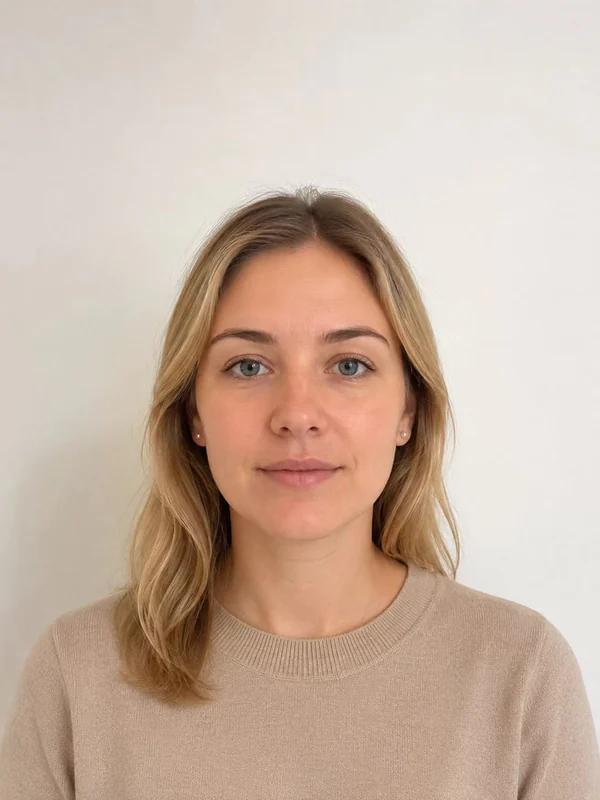 ✓
✓✅ Recommended
Good starting photo
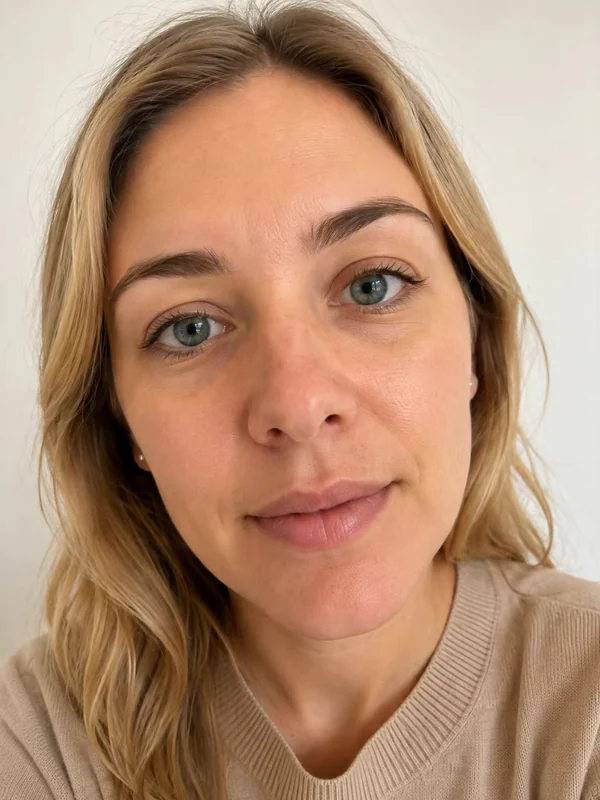 ×
×❌ Too close
Avoid close-up selfies
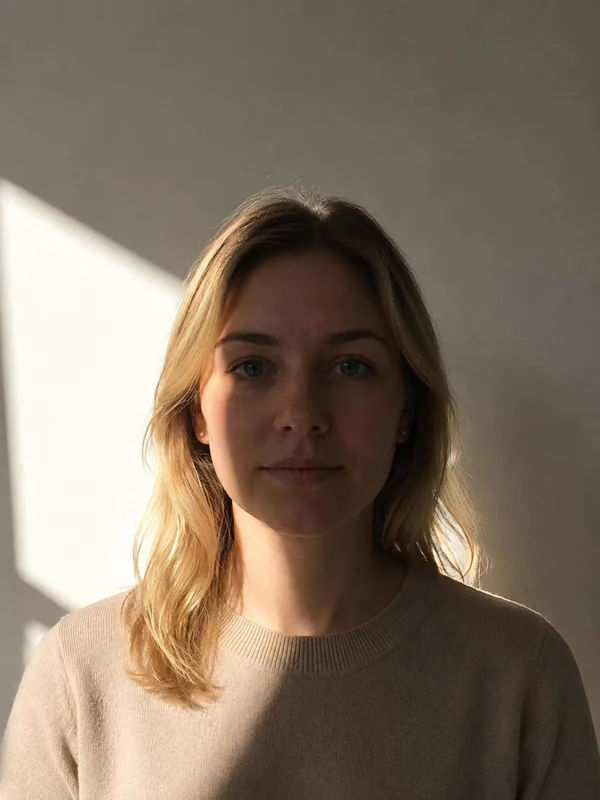 ×
×❌ Poor lighting
Avoid backlighting and strong shadows
Face forward, head and shoulders visible, even light and a plain background.
Recorded photo preset
Output: 35 × 45 mm · 413 × 531 px @ 300 DPI
Required for Japan: White
The free file is a watermarked preview, not a submission-ready official photo.
HD download includes the exact-size digital photo, a 600 DPI print master, and a ready-to-print 4×6" sheet.
What IDPhotoTool can change
Available for this profile
- ✓ Crop
- ✓ Resize
- ✓ Reposition
- ✓ Background replacement
Unavailable for this profile
- × Facial retouching
Background processing is available as a tool capability. This is not a claim of official permission.
Read the recorded official guidance →How to take a photo that passes
Keep your distance
Avoid a close-up selfie. Step back far enough to keep your head and shoulders in frame, or ask someone else to take the photo. This is general capture guidance, not a document-specific authority distance rule.
Face the camera straight on
Camera at eye level, look directly into the lens, neutral expression with your mouth closed. Don't tilt your head.
Find even light
Face a window or light source so there are no shadows on your face. Use the plain background required by your authority; some documents do not permit digital replacement.
Japan passport photo requirements
| Size | 35 × 45 mm (1.38 × 1.77 in) |
| Digital size | 413 × 531 px at 300 DPI |
| Background | White |
| Head height | 71–80% of photo height |
| Authority source | Ministry of Foreign Affairs of Japan ↗Application guide; confirm the photo specification. |
- ✓Photo must be 35 x 45 mm.
- ✓Head height (chin to crown) must be 32–36 mm.
- ✓Plain white or light blue background.
- ✓Taken within the last 6 months.
- ✓No shadows on the face or background.
Database last reviewed 2026-07-13 · see the full requirements database. Always confirm with the issuing authority before submitting your application.
Glasses & head coverings in Japan
Why Japan passport photos get rejected
- ✕Shadows on the background — the most common home-photo failure
- ✕Head height outside 32–36 mm (about 70–80% of the frame)
- ✕Hair covering the outline of the face
- ✕Photo older than 6 months
- ✕Uneven brightness or heavy editing
More detail in our guide to the 8 most common rejection reasons.
Where to submit your application
Prefectural Passport Center (MOFA) ↗
Apply at your prefecture's passport counter with a printed 35 × 45 mm photo; since 2023 online renewal via the Minaportal accepts an uploaded digital photo.
What does a passport photo cost in Japan?
| Photo studio / boothstation photo booths (Ki-Re-i) or studios | ¥800–2,000 |
| IDPhotoTool HD downloadunlimited retakes · digital + printable 4×6" sheet · watermarked preview free | $3.99 |
Save roughly 27% or more — and skip the trip entirely.
Frequently asked questions
Is my photo uploaded to a server?
Cropping, resizing and basic checks are handled in your browser whenever possible. Your photo is uploaded temporarily only when a feature requires server-side processing, and temporary files are automatically deleted.
Will my photo be accepted by the authorities?
The tool crops your photo to the selected document dimensions and places head-position guides based on the current database record. You are responsible for confirming the issuing authority's current rules and following the posing guidance (neutral expression, no glasses, even lighting).
How do I print my passport photo?
The HD download includes a 4×6 inch print sheet with several copies laid out with cut lines. Print it at any pharmacy, photo kiosk or online print service as a standard 4×6 photo, then cut along the lines.
What does the free version include?
You can use the quality checks, cropping, all size presets and background removal where the selected document permits it, then download a watermarked preview for free. The one-time HD purchase removes the watermark and adds the print sheet.
What kind of photo should I start with?
Use a sharp, well-lit photo taken straight-on at eye level, with your full head and shoulders visible and some space around them. Avoid harsh shadows, hats and glasses.